HelperBat feature
Reminders and scheduled tasks
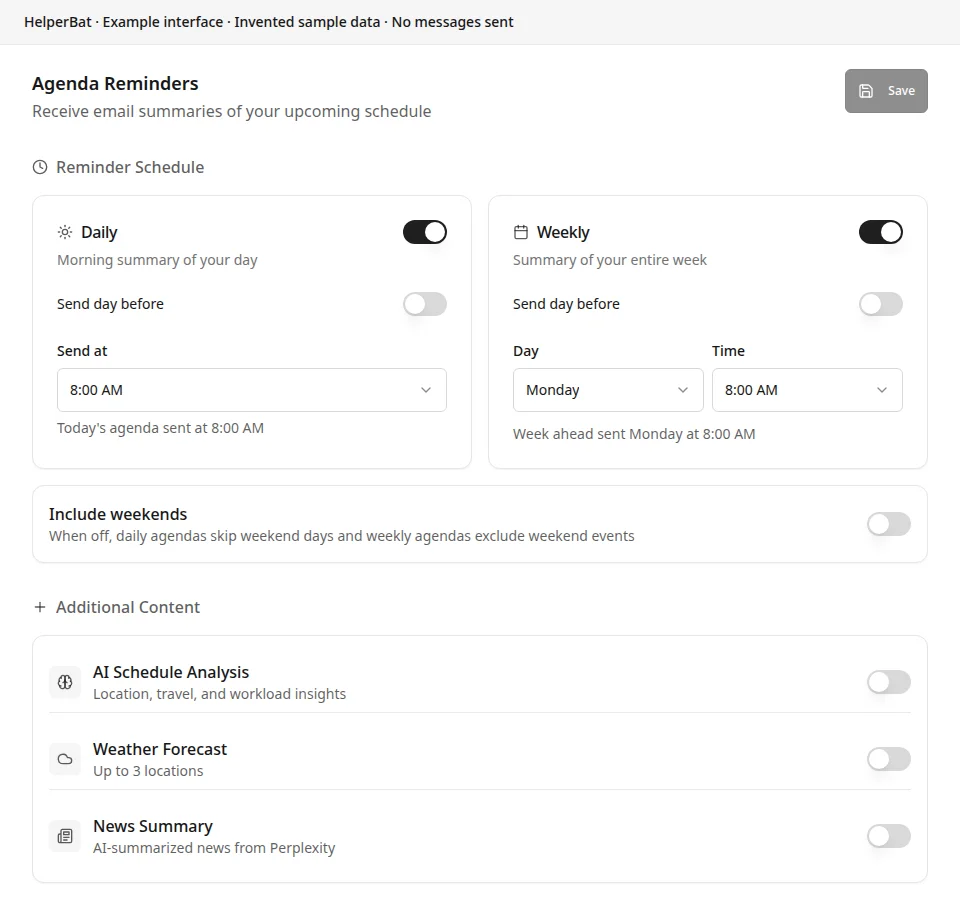
This feature set combines two distinct workflows. Agenda Reminders sends scheduled daily or weekly email summaries of your calendar, with optional content such as weather, news and schedule analysis. Separately, you can ask the email assistant to schedule a future one-time task—such as a follow-up email or reminder to people—and review or cancel scheduled tasks. The task scheduler does not create recurring tasks.
In practice
A realistic use case
A project manager enables a weekday daily agenda email and a weekly look-ahead, adding a weather location and selected news topics. Later, in an email conversation, they ask HelperBat to send a follow-up reminder to the participants tomorrow. The agenda schedules recur on their chosen cadence; the follow-up is a separate one-off scheduled task.
The workflow
From setup to follow-through
- 01
In Agenda Reminders, enable daily and/or weekly calendar summaries and choose the send time. Daily mail can cover today or tomorrow; weekly mail can be sent for the chosen week or the day before.
- 02
Decide whether to include weekends. Add optional calendar analysis, up to three weather locations, news categories and keyword topics, then save your preferences.
- 03
To schedule a separate future action, ask your email assistant for a specific one-time follow-up, email or reminder and when it should happen. The assistant creates a scheduled task from that request; it is not created through a reminder-creation dialog.
- 04
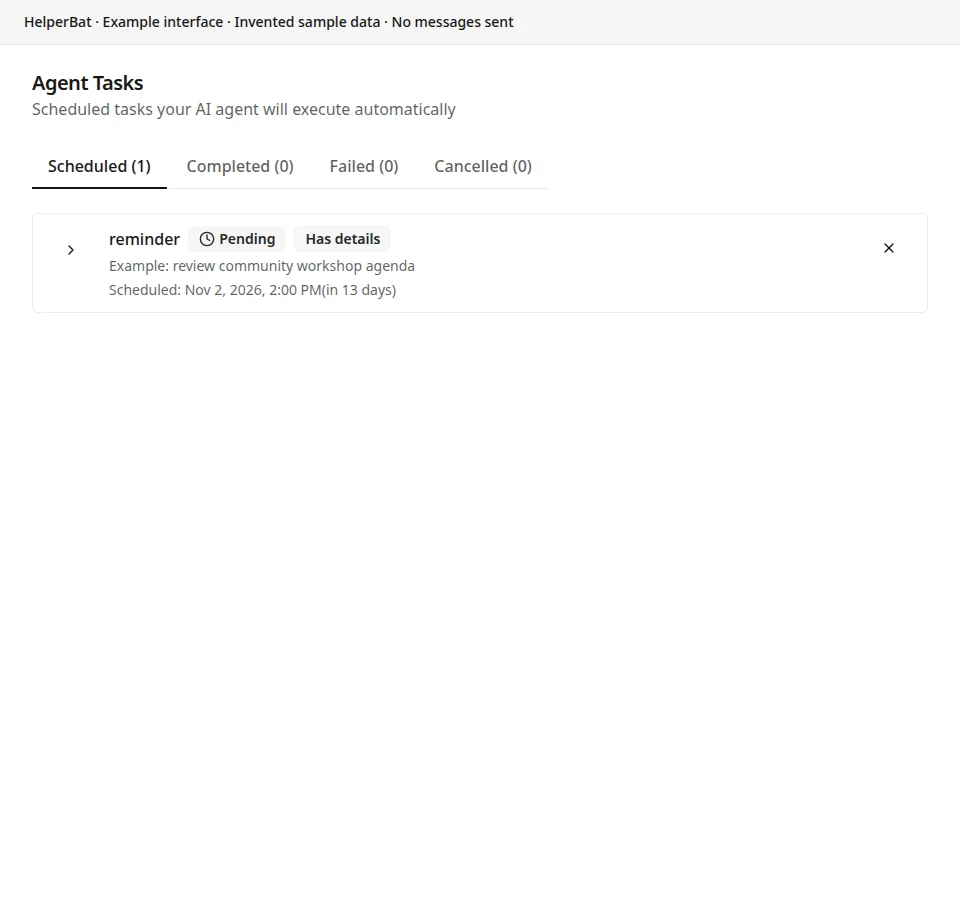
Review the task’s status and cancel it while pending if it is no longer needed. This task workflow is a single scheduled occurrence, not a recurring reminder rule.
A look inside
Screens from the workflow
Good to know
What to expect
- Recurring schedules apply to daily and weekly agenda-summary emails. Agent tasks such as follow-ups or send-reminders are scheduled for a single future time; recurrence is not implemented for those tasks.
- A send-reminder task emails the specified recipients; follow-up and send-email tasks also depend on the recipients and message details supplied to the assistant. Review the intended recipients and message context.
- A custom task is recorded for manual handling; it is not automatically carried out as an email action.
- Agenda email content depends on enabled options and connected calendar data. Optional weather and news are additional summary content, not the scheduled-task workflow.
- If plans change, cancel a pending scheduled task or update the agenda-reminder preferences; a prior request does not automatically infer later changes.
Answers before signup
Frequently asked
What are Agenda Reminders?
They are configurable daily and weekly email summaries of your upcoming calendar. You choose the timing and may add schedule analysis, weather locations and news content.
Can the agenda email arrive the day before?
Yes. Daily summaries can be sent for the next day, and weekly summaries can be sent the day before the selected week begins.
Can I schedule a reminder or follow-up by email?
Yes. Ask the assistant to schedule a one-time future action. Implemented email actions include a thread follow-up, a scheduled email, or a reminder email to specified recipients. The assistant uses the recipients and message context from your request.
Can scheduled tasks repeat?
No. The email assistant’s scheduled tasks are one-time actions. Daily and weekly recurrence is available for calendar agenda-summary emails, not for arbitrary follow-up tasks.
Can I review or cancel a scheduled task?
The assistant can list scheduled tasks. The Agent Tasks list also shows task status and lets you cancel a pending task; scheduled actions are requested through an email conversation, not created from a dashboard reminder dialog.
What happens to a custom scheduled task?
Custom tasks are recorded with their scheduled time and description, but the scheduler does not automatically perform the described action. They require manual handling.
Next step
See if it fits your work.
Plans and prices can change; check the current details before signing up.